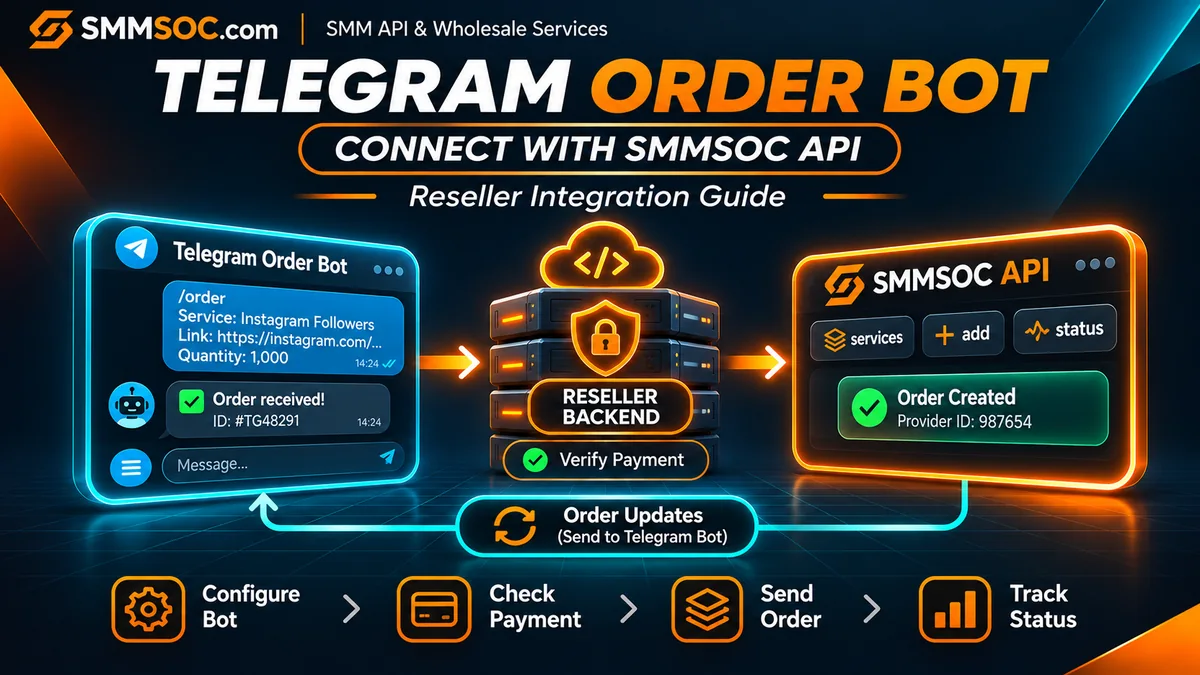
How to Connect a Telegram SMM Order Bot to SMMSOC API
Your customers may already contact your business through Telegram. They ask for service prices, send order details, request updates, and expect you to respond when something changes.
If you handle every request manually, those conversations can become difficult to manage as your customer base grows.
A Telegram ordering bot offers another approach. Customers can interact with a structured menu, submit the details required for a supported service, and receive updates through the same conversation.
But a Telegram bot is only the customer-facing interface. It still needs a backend system to validate orders, manage payments, maintain customer records, and communicate with a supplier.
That is where SMMSOC API integration becomes relevant.
SMMSOC provides a documented API for retrieving available services, submitting supported orders, checking their status, and managing other documented operations.
By connecting that API to your own Telegram bot backend, you can evaluate SMMSOC as a wholesale supplier for a Telegram-based reseller business.
This guide focuses on the actual integration workflow, not on building a generic Telegram chatbot.
Quick answer: To connect a Telegram SMM order bot to SMMSOC, create an SMMSOC account, configure a Telegram bot, build a secure reseller backend, retrieve suitable service information, verify customer payment, and submit approved orders through the SMMSOC API. Store the returned supplier order ID and use status inquiries to provide accurate Telegram updates.
You can start by registering with SMMSOC and reviewing the official API documentation.
Who Should Use a Telegram SMM Order Bot?
This integration is primarily relevant to businesses that already accept orders through Telegram or want to create a structured Telegram ordering channel.
For example, you might operate a small reseller business where customers currently send screenshots and payment confirmations to an administrator.
Another possibility is an agency that uses Telegram to communicate with established customers and wants to reduce repetitive order-status questions.
You may also have an existing Telegram bot with customer accounts, order history, and a payment workflow, but still need a supplier API to connect to.
In each case, the business goal is similar: connect a customer-facing Telegram interaction to a controlled supplier ordering process.
However, the amount of development required depends on what your bot already supports.
SMMSOC supplies the documented provider API. It does not mean that SMMSOC automatically provides or hosts your Telegram ordering bot.
Your own application remains responsible for the Telegram interface, customer authentication, payment validation, and order records.
Telegram SMM Services and a Telegram Ordering Bot Are Different
These terms can sound similar, but they describe different things.
Telegram SMM services are service categories associated with Telegram channels, groups, posts, or other supported platform features.
A Telegram SMM ordering bot is software that customers interact with inside Telegram to browse, purchase, or manage services.
The bot can be used as a storefront for different supported service categories, depending on your business model.
It does not need to sell Telegram-specific services exclusively.
For example, a reseller may use a Telegram bot to present approved service listings associated with multiple social platforms.
The important distinction is that the bot manages the customer interaction, while the external provider API handles supported supplier operations.
Your business must ensure that any products offered through the bot comply with relevant platform policies and applicable laws.
Telegram Bot to SMMSOC: Architecture at a Glance
A practical Telegram ordering integration involves three primary systems:
Telegram: The communication channel where customers interact with your bot.
Your reseller backend: The application that verifies customers, manages balances, checks inputs, creates internal orders, and maintains records.
SMMSOC API: The external supplier interface used for supported service-listing, order-creation, and status-query operations.
A typical workflow starts when a customer selects an available product.
Your backend checks the product details, verifies that the customer is authorized to place the order, and confirms the required payment or available internal balance.
Only after those conditions are satisfied should the backend submit the appropriate request to SMMSOC.
If the supplier accepts the request, your application records the returned provider order ID and sends an acknowledgment through Telegram.
Later, your backend can retrieve relevant order-status information and communicate confirmed updates to the customer.
Telegram should never submit supplier API requests directly from a public chat message without server-side validation.
The reseller backend is the security and business-logic boundary between the customer and the wholesale supplier.
Step 1: Create Your Telegram Bot
The first requirement is a Telegram bot account.
Telegram provides a tool called BotFather for creating and managing bots.
Follow Telegram's official instructions to create a bot and obtain its authentication token.
That token allows your application to communicate with the Telegram Bot API.
Treat it as a secret.
Do not include it in a blog post, public repository, customer-facing JavaScript file, or screenshot.
Choose a Suitable Bot Interface
A simple ordering bot can use commands and interactive buttons.
For example, its menu might include:
- Browse Services
- New Order
- My Orders
- Check Status
- Support
The exact menu is part of your own bot application, not an SMMSOC feature.
Avoid beginning with a large and complicated service catalog.
A smaller menu with clear descriptions and reliable validation is easier to test.
Decide How the Bot Receives Telegram Updates
Telegram officially supports two common approaches.
Long polling: Your backend requests updates using Telegram's getUpdates method.
Webhooks: Telegram sends supported update events to an HTTPS endpoint that your application controls.
For a production webhook, configure the secure endpoint using Telegram's official setWebhook functionality.
Telegram also supports a webhook secret token that can help your backend verify incoming requests.
Do not enable polling and an outgoing webhook simultaneously for the same bot; Telegram documents them as alternative update-delivery methods.
Review the Telegram Bot API documentation before deployment.
Step 2: Create Your SMMSOC API Account
Next, sign up with SMMSOC or sign in to your existing account.
Review the available account features and the current API reference.
The documented API connection details are:
Endpoint: https://smmsoc.com/api/v2
HTTP method: POST
Response format: JSON
Authentication: API key
The documented actions include:
servicesfor available service information.addfor submitting a supported order.statusfor checking order information.balancefor reading the supplier account balance.refillfor eligible refill requests.cancelfor supported cancellation requests.
These functions are not all interchangeable.
Each action has its own parameters and expected response.
Some specialized service types also require additional fields.
Your developer should refer to the SMMSOC API documentation rather than assuming every product follows the same order format.
Where Should You Store Your API Key?
Keep the SMMSOC key in a protected server environment or an appropriate secrets-management system.
The Telegram customer should never see it.
Do not include it in messages sent using Telegram's sendMessage method.
Your reseller application should use the key only when making authorized requests to SMMSOC from the backend.
Step 3: Build Your Bot's Service Menu From Verified Listings
Before allowing customers to place orders, decide which services belong in your Telegram catalog.
SMMSOC documents the services action for retrieving service information.
A service-list response may include the supplier Service ID, name, category, type, rate, minimum quantity, maximum quantity, and supported refill or cancellation flags.
Use those fields to construct your internal product catalog.
Keep Customer Products Separate From Supplier Service IDs
Your Telegram bot should maintain its own product identifiers.
For example, your customer-facing menu might display a simple name or product code.
Behind the scenes, your reseller database maps that product to its corresponding SMMSOC Service ID.
This distinction becomes important if you change suppliers or update your catalog later.
A numeric Service ID should not be assumed to describe the same product at two different suppliers.
Do Not Import Everything Automatically
A large list of services can become difficult for Telegram customers to navigate.
Start with a selected group of listings that fit your business and relevant platform rules.
For each one, review:
- The supported target format.
- Minimum and maximum quantities.
- Current supplier rate.
- Available ordering parameters.
- Service-specific restrictions.
- Refill and cancellation conditions.
Do not describe all services as guaranteed, permanent, or suitable for every account.
A clear, limited catalog is more useful than a long list filled with misleading or outdated descriptions.
Step 4: Collect and Validate the Customer's Order
Once your Telegram menu is ready, design the customer order flow.
For a standard quantity-based service, the bot might ask the customer to select a product, provide the relevant target URL, and enter a quantity.
However, not every service uses those same inputs.
For example, SMMSOC documents different request structures for certain specialized service types.
Your application must validate the requirements of the selected product before accepting it.
Validation Should Happen on the Server
Do not assume that a button or Telegram message contains trustworthy information simply because it came from your bot interface.
Your backend should verify the selected internal product and its mapped supplier service.
It should also check quantity limits and required input formats.
If a product is unavailable or does not meet the applicable conditions, do not allow it to proceed to supplier submission.
Verify Which Customer Owns the Order
A Telegram chat identifier can help your bot route messages, but it is not a replacement for a complete customer-account and authorization system.
Where your application supports customer accounts or balances, associate the Telegram user with the correct internal customer record.
A customer should only be allowed to view or act on orders that belong to the authorized account.
Do not reveal supplier credentials, other customers' order details, or administrative financial information through public bot commands.
Step 5: Verify Payment Before Creating a Supplier Order
This is one of the most important commercial controls.
If your Telegram bot sells services to customers, your own reseller operation must manage how those customers pay.
SMMSOC's provider API is not automatically a checkout system for your Telegram customers.
The customer payment process and the supplier purchasing process are separate.
Recommended Payment Workflow
Your bot can create an internal order awaiting payment.
The backend calculates the customer-facing price using your business's published pricing rules.
Next, the customer completes the payment through whichever approved payment method your business supports.
The backend must then confirm the payment or available wallet balance through an authoritative record.
Only after the funds are confirmed and the order passes validation should the reseller proceed with any supplier purchase.
Do not accept an unverified screenshot as definitive proof that payment has settled.
Do not submit a paid supplier order merely because a customer pressed a confirmation button.
Prevent Repeated Charges
Telegram interactions can be repeated.
A customer may press the same button more than once, or the application may receive a retried webhook event.
Your backend should use a unique internal checkout or order identifier and enforce a single approved purchase transition for that record.
This prevents a repeated Telegram event from triggering multiple supplier orders.
The customer should receive a clear message if an order is already being processed.
Step 6: Submit Approved Orders Through SMMSOC API
After payment and validation, your backend can prepare the supplier request.
For a standard supported order type, SMMSOC documents the action:
add
The relevant parameters can include:
key — Your private SMMSOC API key.
action — The requested operation, such as add.
service — The selected SMMSOC Service ID.
link — The required target URL.
quantity — The requested quantity, where applicable.
Other service types may need different or additional parameters.
Always follow the actual service documentation.
Save Two Different Order IDs
Your Telegram reseller business should maintain its own internal order identifier.
When SMMSOC accepts an order, it can return a separate supplier order ID.
Store both.
The internal order ID is what your application uses for customer records and support.
The provider order ID is used to communicate with SMMSOC about the accepted supplier order.
These IDs should not be confused.
Accepted Does Not Mean Completed
A successful order-creation response means the supplier has accepted the submitted request according to the API response.
It does not mean the service has already been delivered.
Your Telegram bot should communicate this accurately.
For example, an appropriate acknowledgment would be:
Order received. Your request has been submitted to the provider. You can check its current status using My Orders.
Avoid automatically sending a message claiming that the service has been completed immediately after the order is created.
Example: Test the SMMSOC API from Your Backend
Before implementing the paid-order workflow, developers should first confirm that their server can communicate with the SMMSOC API.
The code example below performs a read-only service-list request using PHP and cURL.
It reads the API key from a server environment variable, submits the documented services action, checks the response, and reports the number of service records returned.
It does not place a paid order.
This is an initial connection test—not a complete Telegram bot or payment integration.
The example is intended to run on your backend and requires PHP with cURL enabled.
For additional API implementation concepts, consult the SMMSOC API Integration Guide.
Step 7: Send Order Updates Through Telegram
Once an order has been accepted, customers will likely want to know its current status.
SMMSOC documents a status action for retrieving supported order details.
The API response can include the current order status, charge, starting count, remaining quantity, and currency.
Your backend can store confirmed updates and use Telegram's sendMessage method to communicate relevant changes.
Example Customer Notifications
A Telegram reseller bot might send messages such as:
Order received: Your order has been accepted for processing.
Order in progress: The provider reports that your order is being processed.
Order completed: The provider has marked your order as completed.
Order requires review: The latest provider response requires an additional check.
These are examples of messages generated by the reseller's application.
They are not automatic messages sent directly by SMMSOC to Telegram.
Avoid Excessive Status Requests
Your backend should check outstanding orders at reasonable intervals instead of continuously requesting the same information.
SMMSOC documents individual order-status requests and a multiple-order status interface that can accept up to 100 comma-separated order IDs.
That may be useful when monitoring many active customer orders.
However, batch status retrieval is a feature of the provider interface, not a substitute for keeping accurate internal records.
For an explanation of order-state terminology, see the SMM Panel Order Status Guide.
Step 8: Handle Webhook Retries and Uncertain API Responses
Telegram webhook delivery and supplier order creation are separate operations.
This creates an important reliability challenge.
Telegram may retry delivering an update when your webhook endpoint fails to acknowledge it successfully.
Your application should therefore detect previously processed Telegram updates and avoid creating a new purchase for the same event.
There is also a different risk when communicating with the supplier.
Imagine your backend sends an order to SMMSOC but the connection times out before a definitive response arrives.
You cannot safely assume the supplier rejected the request.
The order may have been accepted even though the response was lost.
Do Not Automatically Resubmit Unknown Orders
Keep the internal order in a review state when the supplier submission outcome is uncertain.
Investigate using available records and provider support when necessary.
Do not automatically create another paid supplier order through SMMSOC or a different provider until the original outcome is understood.
Also distinguish between an API request being submitted and a refill or cancellation request actually being approved.
A reliable bot should communicate confirmed information rather than optimistic assumptions.
Telegram Bot Integration Readiness Checklist
Before making your Telegram ordering bot available to customers, confirm that the connection, payment checks, service mapping, order records, and status messaging work as intended.
The checklist below summarizes the most important operational and security checks.
Complete the applicable checks before routing live customer purchases to SMMSOC.
Common Telegram SMM Bot Integration Mistakes
Exposing the Bot Token or Provider API Key
Both credentials can allow access to protected systems.
Keep them on the server and remove secrets from logs or public files.
Treating Telegram Messages as Verified Orders
A customer message is a request, not a confirmed paid transaction.
Your application must authenticate the customer and validate the order.
Using Service IDs Without Checking the Catalog
A wrong or outdated Service ID can route the customer to an unintended product.
Maintain current, supplier-specific mappings.
Accepting Payment Screenshots Without Verification
Payment evidence sent through chat may be incomplete or misleading.
Use the authoritative payment record before purchasing services from the supplier.
Creating Duplicate Orders From Repeated Button Presses
Telegram users may tap the same action multiple times.
Your backend should recognize a previously submitted internal order.
Showing Supplier Balances to Customers
The wholesale supplier account belongs to the reseller business.
Customers should only see the balances, prices, and records they are authorized to access.
Promising Instant Completion
API submission does not guarantee immediate fulfillment.
Use the current provider status and published service conditions.
Why Consider SMMSOC for Your Telegram Reseller Business?
A Telegram bot requires a supplier connection that fits the features your business intends to use.
SMMSOC provides a documented API covering service listings, supported order submission, order-status retrieval, account balance inquiries, and other relevant operations.
This gives developers a technical reference for evaluating integration.
However, the suitability of SMMSOC depends on the services your business requires, their current conditions, your application architecture, and applicable policies.
A Telegram-based reseller should compare actual service information rather than relying only on promotional pricing claims.
If you already operate a bot with customer accounts and payment processing, you can review whether the SMMSOC API fits that existing workflow.
If you are developing a new bot, start with a read-only API test and a small internal catalog before moving to paid transactions.
Review the SMMSOC API Documentation
Frequently Asked Questions
Can I connect a Telegram SMM order bot to SMMSOC API?
Yes. A developer can build a backend application that receives Telegram bot interactions and uses SMMSOC's documented API for supported supplier operations.
Does SMMSOC provide a ready-made Telegram ordering bot?
The public SMMSOC API documentation confirms provider operations, not a hosted Telegram ordering bot. You should plan to use your own bot application or compatible reseller software.
Do I need a website to use a Telegram SMM bot?
Not necessarily a public storefront website, but your bot still needs a backend service to manage customers, validate orders, maintain records, and securely call the provider API.
What programming language can I use?
PHP, Python, Node.js, and other backend environments can communicate with HTTP APIs. The appropriate choice depends on your existing application and development resources.
Does the Telegram bot submit customer payments directly to SMMSOC?
Not automatically. Your reseller system must manage and verify its customer-facing payment process separately from the supplier API connection.
Can my bot check order status automatically?
Your backend can request supported status information from SMMSOC and send confirmed updates to customers using the Telegram Bot API. The bot must implement this workflow.
How do I prevent duplicate orders?
Use persistent internal order identifiers, prevent repeated paid submissions for the same checkout, track processed Telegram updates, and investigate uncertain supplier responses before retrying.
Is the SMMSOC API key the same as the Telegram bot token?
No. Telegram issues the bot token for Telegram API access. SMMSOC uses its own API key for supplier authentication. Both should remain confidential.
Can I import all SMMSOC services into a Telegram bot?
A compatible application can retrieve the service list, but the reseller should select suitable listings, review restrictions, and build a manageable customer-facing catalog.
Does this integration guarantee service delivery or business growth?
No. API integration enables supported software communication. It does not guarantee uninterrupted availability, service completion, customer demand, or particular marketing results.
Start Building Your Telegram Reseller Workflow With SMMSOC
A Telegram bot can make the customer ordering experience more structured, but the integration must be designed around accurate records and secure processing.
Keep Telegram credentials protected.
Validate customer requests and payments on your server.
Map products to the correct SMMSOC Service IDs.
Record supplier order identifiers and communicate confirmed order statuses instead of unsupported promises.
If your business already accepts orders through Telegram, connecting a documented wholesale provider API may help you build a more organized purchasing workflow without relying entirely on manual order entry.
The first step is to review the supplier's published interface and determine whether it matches your application's requirements.
Read Our SMM Panel API Integration Guide
Build the customer experience around your own brand, and use verified supplier operations to support the parts of the ordering process that your application can manage reliably.