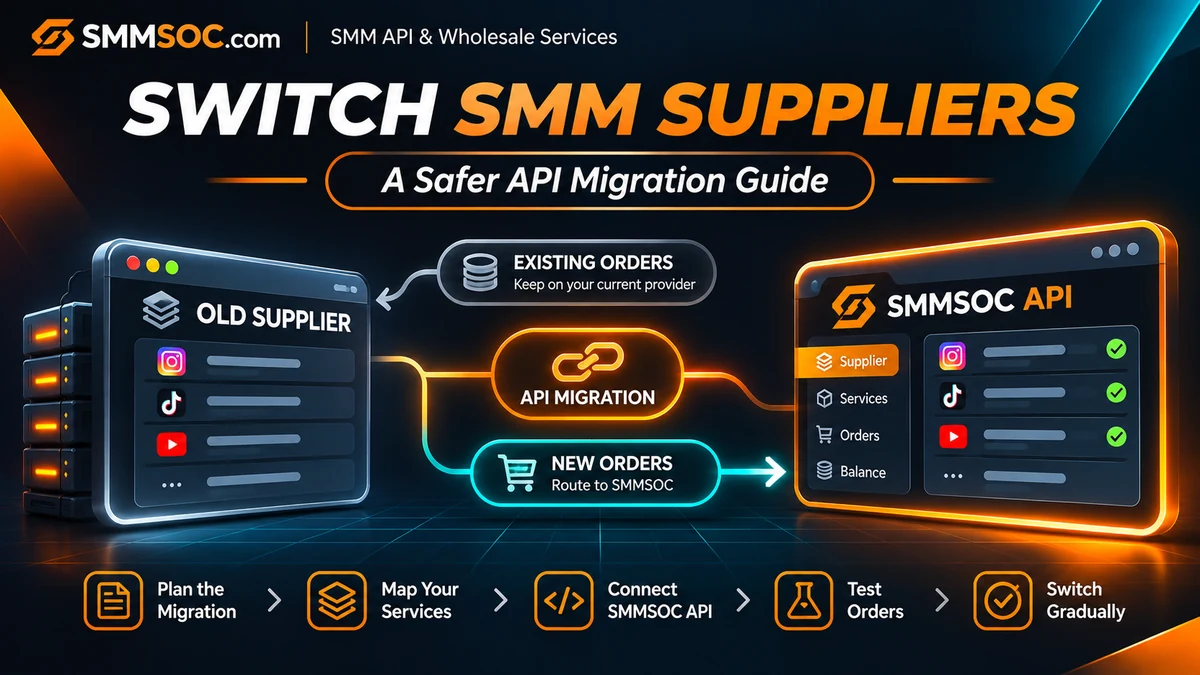
How to Switch Your SMM Panel Supplier to SMMSOC: A Safer API Migration Guide
Running an SMM reseller panel does not mean you have to keep using the same supplier forever.
Your current provider may no longer offer the service selection you need. You might be reviewing alternative wholesale rates, looking for different API capabilities, or trying to reduce dependence on one supplier.
Whatever the reason, switching an SMM panel provider requires more than changing an API key.
Your business may already have active customer orders, provider-specific service IDs, outstanding support requests, and prices linked to your existing supplier. Replacing that connection without a plan can create avoidable accounting errors, incorrect order routing, and customer confusion.
The more practical approach is to evaluate a new provider, map its services, preserve existing order records, and gradually direct eligible new orders to the replacement supplier.
In this guide, we'll explain how to evaluate SMMSOC as your next SMM API provider and organize a controlled supplier transition without unnecessarily replacing your reseller website.
Quick answer: To switch your SMM panel supplier to SMMSOC, create an SMMSOC account, verify API compatibility, map your existing reseller services to appropriate SMMSOC Service IDs, test the connection, and update routing for selected new orders. Keep unfinished orders associated with the original supplier until their status and financial records are resolved.
You can create an SMMSOC account and review the SMMSOC API documentation before planning a transition.
Why Do SMM Resellers Change Suppliers?
Not every provider change begins with a technical problem.
Sometimes a reseller simply outgrows its original setup.
A business that started with a small collection of services may later need additional categories, clearer order tracking, or a supplier whose available integrations better fit its current workflow.
Other common reasons include:
- Reviewing wholesale prices and overall operating costs.
- Adding alternative services to an established reseller catalog.
- Looking for documented API functionality.
- Reducing reliance on a single supplier.
- Reassessing service restrictions and support procedures.
- Expanding an existing panel without rebuilding the storefront.
However, switching providers should not be treated as an automatic solution to every delivery or customer-support problem.
A new supplier may have different service conditions, availability, and operating requirements.
The objective is not simply to change suppliers. It is to determine whether the new connection works better for the specific services your business needs.
Switching an API Supplier Is Not the Same as Moving Your SMM Panel
This is an important distinction for existing panel owners.
A supplier migration changes where selected future orders are sent.
A website or platform migration changes the system used to operate your entire reseller business.
These are different projects.
For example, if you already use Perfect Panel, you may be able to add or replace a compatible external supplier without moving your website, customer accounts, or entire database.
Similarly, a custom PHP reseller panel may support changing supplier connections through its administrative or backend configuration.
Whether this is possible depends on your software and integration capabilities.
You should not assume that replacing a supplier API automatically transfers:
- Historical customer orders.
- Existing provider order IDs.
- Unused balances held with the previous supplier.
- Refill rights or guarantee periods.
- Pending cancellation requests.
- Open support tickets.
- Supplier-specific service identifiers.
Those records remain subject to their original systems and applicable policies.
If you are planning to move your entire panel to different software, that requires a separate platform migration plan.
This article focuses on changing an external SMM service supplier while preserving your existing reseller operation.
Step 1: Audit Your Current Supplier Before Making Changes
A successful migration begins with understanding what is already running.
Before removing or changing any provider connection, create a record of the services and orders associated with it.
Start with your existing service catalog.
Identify which customer-facing services currently route to the supplier you want to replace.
Then examine the orders that have not reached a confirmed final state.
Separate Active and Finished Orders
The most important distinction is between historical orders and new requests.
An unfinished order should continue to be tracked through the provider that originally accepted it.
Consider an example:
A customer submits an order through your reseller panel on Monday. Your original supplier accepts that order and returns its own provider order ID.
On Tuesday, you decide to connect SMMSOC.
Changing the supplier configuration does not move Monday's order into SMMSOC.
The old provider remains responsible for processing that original order under its terms.
If you simply overwrite the old supplier reference, your dashboard could lose the information needed to track it correctly.
What Should You Record?
For each outstanding order, preserve:
- Internal customer order ID.
- Original supplier name.
- Original provider order ID.
- Original service ID.
- Current confirmed order status.
- Recorded charge and currency.
- Relevant refill or cancellation eligibility.
- Date of the last successful status check.
Where supported, export or back up this information before the transition.
Keep administrative records and API credentials protected.
Do not delete an existing provider connection while unresolved orders still depend on it unless you have an alternative supported way to preserve their tracking.
Step 2: Evaluate SMMSOC as Your Replacement API Provider
Once your current system is documented, review the proposed replacement.
SMMSOC provides a documented API for supported reseller operations.
Its public API reference specifies:
API endpoint: https://smmsoc.com/api/v2
HTTP method: POST
Response format: JSON
Authentication: Account API key.
The published interface documents operations including service retrieval, order creation, order status inquiries, balance checks, and supported refill and cancellation requests.
These functions can support a reseller integration, but they should be evaluated against the requirements of your existing panel.
For example, ask:
Does your reseller software support external supplier connections?
Can it retrieve the supplier's service list?
Can it preserve internal and provider order IDs separately?
Does it support provider-specific order-status tracking?
Can you update routing without changing historical orders?
Can the integration correctly handle different service input requirements?
If your platform uses a directory of supported external providers, confirm that SMMSOC is available before assuming the connection can be added automatically.
For general technical background, read the SMMSOC API Integration Guide.
Create Your SMMSOC Account
If the available API functions match your requirements, register with SMMSOC.
After signing in, review your account's API access, the applicable service catalog, and the current terms.
Use only your own account credentials.
Never publish a live API key in frontend JavaScript, public documentation, or customer-visible support messages.
Step 3: Map Your Existing Services to SMMSOC Service IDs
This is one of the most important parts of switching SMM panel suppliers.
Different providers use their own service identifiers.
A service listed under one ID at your current supplier should not be assumed to have the same ID at SMMSOC.
Even when two service names look similar, their conditions may differ.
Create a Service Mapping Record
Your reseller panel should preserve its own internal product identifier wherever possible.
Then associate that internal product with the appropriate supplier-specific service ID.
For each product you intend to migrate, record:
Current reseller product: The service customers already see in your storefront.
Old provider reference: The existing supplier and service ID.
New SMMSOC reference: The selected SMMSOC service ID, after verification.
Service conditions: Supported quantity limits, format, restrictions, and other relevant details.
Current routing: Whether new orders should still go to the old provider or have been approved for SMMSOC.
This prevents the common mistake of changing a supplier URL while leaving an unrelated service ID attached to the customer-facing product.
Do Not Match Services by Name Alone
Two listings might use similar descriptions while having different operational conditions.
Before selecting a replacement service, compare:
- The exact service type.
- Required link or target format.
- Minimum and maximum quantities.
- Current rate and currency.
- Refill availability and conditions.
- Supported cancellation rules.
- Any service-specific restrictions.
If there is no appropriate match, leave the old listing unchanged, disable it for new orders, or create a separate correctly described reseller product.
Do not market an unverified replacement as equivalent to the previous service.
Step 4: Check Your Pricing Before the Switch
Changing suppliers can change your operating costs.
Before moving an existing reseller product to SMMSOC, compare the current wholesale price of the selected service with the rate used in your customer-facing panel.
Do not compare listings based exclusively on the advertised cost per 1,000 units.
Check whether the pricing unit, order quantity limits, and service specifications are comparable.
You should also account for:
- Payment and currency conversion costs.
- Customer-support workload.
- Operational expenses.
- Order adjustments and financial reconciliation.
- Your intended reseller margin.
If a new supplier rate is different, determine whether the customer-facing price needs to change.
For example, a product that remains profitable with one provider may not produce the same margin after being routed to another.
Equally, a lower supplier rate does not guarantee a better final result when service conditions or operating expenses differ.
SMMSOC's published terms allow rates to change. Your integration should therefore rely on current service information rather than permanently assuming an initial rate remains valid.
For more detail, read our SMM Reseller Pricing and Profit Margins Guide.
Step 5: Connect SMMSOC Without Replacing Historical Order Records
Now prepare the new provider connection.
The implementation depends on your reseller software.
Some platforms offer an external provider management interface. Custom-developed systems may require backend configuration.
The key principle is the same:
Add or configure SMMSOC as a supplier for future requests without rewriting the supplier identity of existing orders.
If your software supports multiple providers, keeping the old connection available during the transition can make monitoring simpler.
If your platform only supports one provider per service, check whether you can preserve the old order records independently before changing routing.
Keep Provider Order IDs Separate
Your customers may see order identifiers assigned by your own panel.
The supplier may return a different identifier when an order is accepted.
Both should be stored.
For example, a reseller customer order and its associated supplier order are separate records connected through your internal system.
Changing to SMMSOC should not erase that relationship for previous orders.
When new orders are eventually submitted to SMMSOC, your system should save the new SMMSOC order IDs and associate them with the relevant internal customer orders.
Do not mix these identifiers with references from a different supplier.
Step 6: Test the SMMSOC Connection Before Live Routing
Avoid moving your entire catalog immediately.
Begin with checks that do not create purchases.
For example, SMMSOC's documentation provides a services action for retrieving service information and a balance action for account balance inquiries.
These can help establish whether your integration is communicating with the intended account.
A successful read-only request does not prove that order submission or fulfillment will work correctly.
Verify the Order Submission Path
If a real-order test is necessary, choose a small, permitted purchase that meets the selected service's requirements.
This is a real order and may incur a charge. Do not assume that free test balance is available.
Confirm that the reseller backend:
- Sends the intended service ID and required order information.
- Correctly handles the supplier's response.
- Stores the returned provider order ID.
- Associates the response with the right customer-side record.
- Can retrieve the relevant order status.
- Handles a failed or uncertain response without blindly sending a duplicate request.
Use a controlled test appropriate to the service and relevant platform rules.
Do not run overlapping orders on the same target where the service conditions prohibit them.
Step 7: Move New Orders Gradually to SMMSOC
Once the connection and selected services have been reviewed, plan the cutover.
A cutover is the point at which your reseller system begins directing specified new orders to the new supplier.
For an established panel, a gradual transition is often easier to supervise than changing every service simultaneously.
You could begin with a small number of compatible reseller products.
Review their first transactions and confirm that they reach the intended supplier.
Then expand the configuration only after the order routing and administrative records behave as expected.
Keep Two Different Order Groups
During the transition, you may have two groups of orders.
Existing orders: Continue to be monitored through the old supplier or their preserved historical records.
New orders: Use SMMSOC only for the products and routing rules you have deliberately approved.
Avoid automatically resubmitting unfinished old orders to the new supplier.
An open order does not become invalid simply because your business has changed its preferred provider.
Cancellation or other action on the original order must follow the original supplier's applicable rules.
Supplier Migration Cutover Checklist
Use the checklist below to confirm that your reseller business is prepared before routing customer orders to a new supplier.
Complete each applicable check before expanding the migration to additional products.
Step 8: Monitor the First Orders After Cutover
The migration is not finished when the provider connection shows as active.
The next stage is monitoring the real workflow.
Look for unusual differences between customer-side and supplier-side records.
Examples include a service routed to the wrong provider, incorrect quantity restrictions, missing order IDs, or an unexpected difference between the displayed supplier charge and the reseller's internal record.
Also review the available provider balance, order-state changes, and customer-support requests.
Make Sure Statuses Come From the Correct Supplier
SMMSOC documents a status action for retrieving supported order information.
However, that action should be used for orders actually associated with SMMSOC.
Do not attempt to use SMMSOC order-status requests to retrieve an unrelated provider's historical order identifiers.
For a detailed explanation of order states, consult our SMM Panel Order Status Guide.
Review Partial and Canceled Orders Carefully
Partial delivery, cancellation requests, and financial adjustments should be reviewed against the actual supplier records.
A request for cancellation does not automatically mean cancellation has been approved.
Similarly, refill requests depend on the conditions of the relevant original service.
A change of supplier does not transfer refill guarantees from old orders to new ones.
Step 9: Maintain a Rollback Plan
Even a carefully reviewed provider change can reveal unexpected problems.
For that reason, keep a recovery option available while you evaluate the new setup.
A rollback plan should identify:
- Which new-order routing rules can be paused.
- Which reseller products can temporarily be disabled.
- How the former provider configuration can be restored, where permitted.
- Which order records and balances must remain accessible.
- Who is responsible for reviewing unresolved submissions.
Rollback does not mean that orders already accepted by SMMSOC are moved back to the old supplier.
Those orders remain associated with the provider that accepted them.
The goal is to control future order submissions while preserving the accuracy of existing records.
If the result of an API request is uncertain, investigate before resubmitting it.
Common Mistakes When Changing SMM Panel Providers
Replacing Every Service ID at Once
A wholesale replacement can create mismatches if individual products have different service requirements.
Use verified, product-by-product mapping.
Deleting the Old Provider Too Early
Removing provider configuration may interfere with historical order checks and unresolved support requests.
Preserve required records first.
Assuming the API Transfers Balances
An API connection does not transfer money between supplier accounts.
Any funds remaining with an old supplier are subject to that provider's financial terms.
Forgetting About Existing Refill Requests
A refill or cancellation request may still be pending when the new supplier is connected.
Track that request with the original provider.
Changing Prices Without Reviewing the Service
A lower rate does not establish that two services are equivalent.
Compare relevant conditions before changing the listing presented to customers.
Promising Zero Downtime or Guaranteed Results
A provider migration can be organized to reduce operational disruption, but an uninterrupted transition should not be promised without evidence.
API connectivity also does not guarantee service delivery times, retention, genuine engagement, or platform compliance.
Is SMMSOC a Suitable Replacement for Your Current Supplier?
The answer depends on your business.
SMMSOC provides a documented API covering supported ordering and account-management operations.
This gives reseller businesses a technical starting point for evaluating integration.
However, the final decision should depend on your software's compatibility, required services, commercial terms, and operational needs.
Before switching, confirm:
API fit: Does the interface support the functions you require?
Catalog fit: Are appropriate services available for your customers?
Financial fit: Do the current costs and account conditions work for your business?
Operational fit: Can you manage orders, support cases, and provider records consistently?
Policy fit: Are the intended services permitted under applicable platform rules and business policies?
If SMMSOC is suitable, it can be evaluated as your next supplier or as an additional provider, where your reseller software supports that configuration.
You can open an SMMSOC account and review its API documentation before committing to a full supplier transition.
Frequently Asked Questions
How do I switch my SMM panel provider to SMMSOC?
Create an SMMSOC account, verify that your reseller software supports its API, map your services to valid SMMSOC Service IDs, test the connection, and route selected new orders to SMMSOC. Preserve open orders with their original provider.
Can I change SMM suppliers without changing my website?
Often, yes. If your reseller software supports external supplier connections, you may be able to change order routing without rebuilding your storefront. The exact process depends on your platform.
Will my old orders automatically transfer to SMMSOC?
No. Connecting a new supplier API does not automatically move orders previously accepted by another provider. Historical orders and their status records must be preserved separately.
Can I keep my existing customer-facing service IDs?
That depends on your reseller software. Systems that separate internal product IDs from supplier-specific Service IDs can usually maintain stable customer-facing records while updating the supplier mapping.
Can I use SMMSOC with Perfect Panel?
Perfect Panel supports external provider integrations. Confirm whether SMMSOC is supported in the relevant Perfect Panel provider directory or request integration if needed.
What happens to my old supplier balance?
Changing your API supplier does not transfer account balances. Any remaining funds stay subject to the previous provider's financial and account policies.
Should I cancel every old order before switching?
No. Do not cancel or resubmit orders automatically. Review their current status and applicable conditions. Orders already in progress may need to remain with their original supplier until resolved.
Does SMMSOC API support tracking orders?
Yes. SMMSOC documents individual and multiple-order status inquiries. A reseller should use the correct supplier-specific order identifiers when requesting that information.
Should I move all my reseller services at once?
A gradual migration is generally easier to review. Verify selected service mappings, confirm real order routing, and monitor the results before expanding to additional products.
Can switching suppliers guarantee better service results?
No. A different supplier connection does not guarantee delivery speed, service retention, customer satisfaction, or any particular marketing outcome. Compare actual service terms and maintain appropriate compliance checks.
Ready to Evaluate SMMSOC as Your Next SMM API Supplier?
You do not necessarily need to rebuild your reseller panel to evaluate a different service supplier.
The safer approach is to keep control of your existing records, confirm compatibility, review the new service mappings, and move eligible new orders only when the setup is ready.
SMMSOC offers a documented API that reseller businesses can examine before deciding whether it fits their existing operations.
If your current provider no longer matches your requirements, start with the integration details rather than making a rushed change.
Explore the SMMSOC API Documentation
Read the SMMSOC Terms of Service
A supplier change should give your business more control over future order routing—not put your existing customer records at risk.