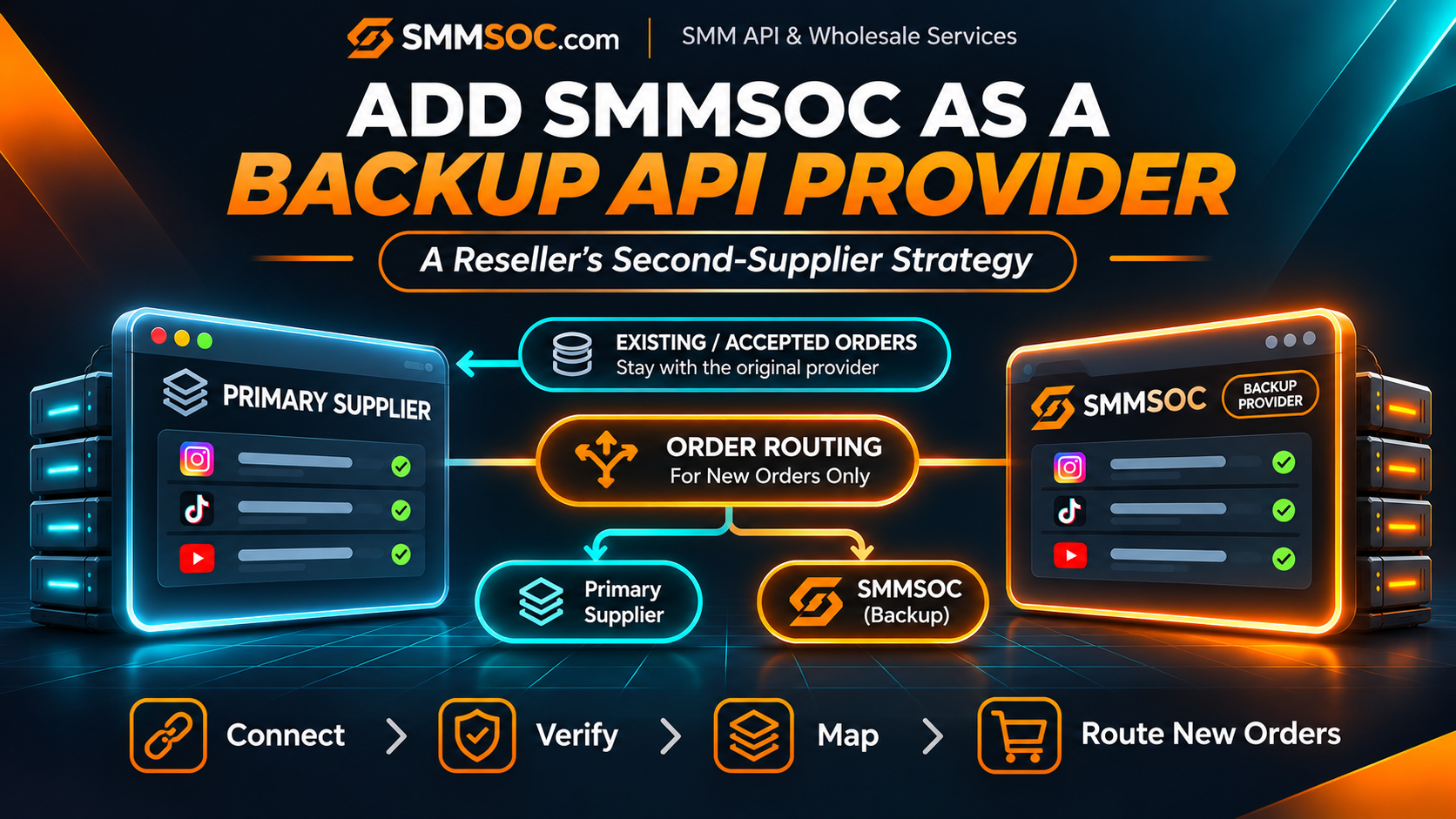
How to Add SMMSOC as a Backup SMM API Provider Without Replacing Your Main Supplier
Your SMM reseller business may already have a supplier that handles most of your orders.
Perhaps the connection works well enough, your existing services are configured, and you have no immediate reason to replace that provider.
But what happens when you want to offer a service that your current supplier does not provide? Or when you need an alternative wholesale source for selected products?
You do not necessarily need to replace your main supplier.
Instead, you can evaluate SMMSOC as a backup SMM API provider and connect it as an additional supplier, provided your reseller software supports multiple provider connections.
This approach lets you preserve your existing supplier relationships while preparing a second source for suitable future orders.
However, there is an important distinction: connecting a second API provider does not automatically create a working failover system.
Your reseller platform must support the required routing controls, and the correct supplier must remain associated with every accepted order.
In this guide, we explain how to evaluate SMMSOC as a second SMM supplier, organize your service catalog, test the connection, and establish safe rules for using multiple providers.
Quick answer: To add SMMSOC as a backup SMM supplier, create an account, confirm that your reseller software supports additional provider APIs, configure the SMMSOC connection, map suitable services, and define how eligible new orders will be routed. Existing orders should remain attached to the provider that originally accepted them.
You can begin by creating an SMMSOC account and reviewing the official SMMSOC API documentation.
Why Would an SMM Reseller Need a Second API Provider?
A second supplier can serve several different business purposes.
It may provide access to alternative service categories, help a reseller compare operating costs, or reduce dependence on a single supplier relationship.
Consider a reseller operating a storefront with hundreds of service listings.
Most of those products may already be connected to its original supplier.
There is no obvious benefit in deleting the existing configuration simply to evaluate another API provider.
Instead, the reseller could maintain its current connections and investigate whether selected products are better suited to an additional supplier.
Expanding Your Available Service Catalog
Different suppliers may maintain different service listings, quantity restrictions, and service conditions.
If your existing supplier does not offer a suitable product for a particular customer requirement, a second catalog gives you another source to evaluate.
However, availability alone does not establish that a service is appropriate.
You must still review its specifications, restrictions, and applicable social media platform policies.
Reviewing Different Wholesale Costs
A second supplier also creates another point of comparison for specific product categories.
It allows you to evaluate current wholesale rates without immediately replacing your established provider.
Price should never be the only consideration.
A reseller must also account for the selected service's requirements, provider compatibility, support workflow, and actual order conditions.
Reducing Dependence on One Connection
Relying on one external provider creates a single supplier relationship on which your business depends.
An additional provider can give your operation more sourcing choices.
That said, a backup supplier is an option, not a guarantee of uninterrupted service.
If both providers rely on similar external systems or experience the same platform restrictions, having two connections may not eliminate disruptions.
A second provider also introduces additional monitoring and administrative responsibilities.
Backup SMM Supplier vs. Replacing Your Main Provider
These approaches solve different problems.
Replacing your main supplier involves transferring selected future order routing away from an existing provider.
Adding a backup supplier involves keeping the original provider and connecting another supplier alongside it.
In a backup arrangement, your current supplier can continue handling its existing catalog and accepted orders.
SMMSOC can be evaluated for selected additional products or future orders that your reseller software is configured to send to it.
You are not required to migrate your entire storefront, rewrite historical order records, or change every service at the same time.
Two Ways to Use a Secondary Provider
A reseller may use an additional supplier in either of these ways.
Separate service sourcing: Some customer-facing products are mapped to the original provider, while other products are mapped to SMMSOC.
Controlled alternative routing: The reseller's software or administrator selects a different supplier for a compatible order that has not yet been submitted.
The second arrangement requires suitable routing features.
Do not assume your reseller platform automatically chooses another provider when the primary supplier encounters an error.
That function must be supported and configured separately.
What You Need Before Adding SMMSOC
Before configuring a second supplier, make sure your reseller operation has the necessary administrative controls.
You should have:
- An existing reseller panel or ordering system.
- Administrator access to the provider configuration.
- The ability to connect an additional external API, where supported.
- An SMMSOC account with appropriate API access.
- A way to store supplier-specific Service IDs.
- A way to preserve the actual supplier for each submitted order.
- Secure storage for API credentials.
Your reseller software is particularly important.
For example, Perfect Panel publicly advertises support for multiple external suppliers.
However, the availability of a particular provider integration must still be verified through its official directory or support process.
Custom reseller platforms may require their own backend logic for provider selection.
If your software supports only one provider connection, adding a true secondary supplier may require additional development or a platform-specific feature.
Step 1: Create Your SMMSOC Supplier Account
Start by visiting the SMMSOC registration page.
If you already have an account, sign in rather than creating unnecessary duplicates.
Review the account information, available API documentation, and current service conditions.
SMMSOC publishes a provider API that supports several account and order-management operations.
Its documented endpoint is:
https://smmsoc.com/api/v2
The published interface uses HTTP POST requests and returns JSON responses.
Authentication uses an account API key.
Keep Your Supplier Credentials Separate
Your original provider and SMMSOC are separate supplier accounts.
Each may have its own API credentials, balance, service catalog, and order records.
Avoid storing credentials in shared frontend code.
Your reseller application should use secure server-side configuration for provider authentication.
If you use multiple suppliers, label credentials clearly so your application does not accidentally send requests to the wrong account.
For general technical background, read the SMMSOC SMM Panel API Integration Guide.
Step 2: Confirm That Your Reseller Platform Supports a Second Supplier
Before entering API credentials, verify that your current reseller platform can manage more than one external provider.
Some systems support several suppliers directly through their administrator dashboard.
Others require custom integration work.
If you operate a Perfect Panel-based website, check its official provider directory and current configuration requirements.
Perfect Panel documents support for multiple providers, but this does not establish that every possible supplier is already integrated.
If SMMSOC is not supported in your specific configuration, request the relevant integration through the official Perfect Panel process.
For a custom-developed reseller system, determine whether your database and application already distinguish between:
- Internal customer products.
- External supplier records.
- Supplier-specific Service IDs.
- Internal customer orders.
- External provider order IDs.
These distinctions become essential once more than one supplier is connected.
Do Not Overwrite the Primary Provider
If your platform permits multiple supplier entries, add SMMSOC as a separate provider record.
Do not replace the existing supplier's API key or endpoint unless you intentionally plan to change that connection.
The objective is to preserve your primary provider while creating an additional source.
Step 3: Check the SMMSOC API Before Importing Services
Once your connection is configured, begin with operations that do not create paid orders.
SMMSOC's public API documentation identifies a services action for retrieving the service catalog and a balance action for reviewing account balance information.
These are useful initial checks because they can help confirm that your server is communicating with the intended account.
What Should You Confirm?
First, verify that your application reaches the documented endpoint.
Next, confirm that the credentials are valid.
Then inspect whether the returned data matches the operation you requested.
A successful authenticated response is useful, but it is not proof that every service or order operation will function correctly.
You should still test the features your reseller application intends to use.
Avoid Testing With Unnecessary Paid Orders
Do not create repeated orders simply to verify that the API URL is reachable.
Read-only checks should come first.
If an actual order test is required later, use a permitted service and understand that it is a real transaction that may incur a charge.
Do not assume free test balance is included.
Step 4: Select Which Products Should Use SMMSOC
The next decision is commercial rather than purely technical.
You do not need to import every service available from a secondary provider.
Instead, identify products where having an additional source would make operational sense.
For example, you might discover that a particular product category is not adequately covered by your primary supplier.
That category may be a candidate for evaluating SMMSOC.
Alternatively, you may prefer to preserve the original supplier's catalog and add new products that are specifically associated with SMMSOC.
Create an Independent Service Mapping
A customer-facing product should not rely on the assumption that two providers share the same Service ID.
Each supplier manages its own identifiers.
For example, Service ID 250 at one supplier could represent a completely different listing from Service ID 250 at another.
Your internal system should associate the customer-facing product with both a supplier identity and the corresponding external Service ID.
Before approving a secondary mapping, review:
- The actual service type.
- Target requirements.
- Minimum and maximum order quantities.
- Published price and currency.
- Current service restrictions.
- Refill conditions, where applicable.
- Cancellation eligibility, where applicable.
A similarly named listing should not automatically be treated as an equivalent replacement.
If two products have materially different conditions, consider presenting them separately rather than hiding the differences behind one customer-facing description.
Step 5: Decide When New Orders May Use Your Backup Supplier
This is the central part of a backup supplier strategy.
A second provider becomes operationally useful only when your reseller business has a clear process for deciding which supplier receives an order.
The process can be manual or supported by your platform's routing capabilities.
Option A: Dedicated Secondary Services
This is often the easiest arrangement to understand.
Selected reseller products are connected directly to SMMSOC.
Your existing products continue to use the original supplier.
Customers can order the products available in your catalog, and your backend routes each one according to its configured provider mapping.
This approach does not require the application to decide between two suppliers for the same customer-facing product.
It also makes administrative reviews more straightforward.
Option B: Manual Alternative Routing
An administrator may choose to redirect eligible future orders to SMMSOC when a suitable product exists.
The important word is future.
Do not move an already accepted order to another provider by simply changing its supplier reference.
When reviewing an alternative route, confirm that the order has not already been submitted to the original supplier.
Option C: Software-Controlled Routing
Some reseller systems may support custom routing rules or other mechanisms for selecting an external provider.
Such a system might use service availability, administrator-defined preferences, or other validated conditions to determine the supplier for a new order.
However, these capabilities belong to the reseller platform or custom software.
SMMSOC's published API documentation does not itself establish an automatic cross-provider failover feature.
If your platform does not provide that functionality, connecting a second API will not create it automatically.
Step 6: Prevent Duplicate Orders During Provider Changes
A poorly designed backup process can create a serious problem.
Imagine a customer submits an order through your reseller panel.
Your application sends it to the primary supplier.
The network connection then times out before your system receives a confirmed response.
At this point, you do not necessarily know whether the supplier accepted the order.
If your reseller software immediately submits the same request to SMMSOC, the customer could end up with two paid supplier orders.
This is not a safe failover strategy.
Understand the Difference Between Failure and Uncertainty
Confirmed pre-submission failure: Your application knows that no supplier request was made.
Confirmed rejection: The supplier explicitly rejected the request, and your system has reliable evidence that no order was accepted.
Uncertain submission: A request may have reached the supplier, but your application did not receive or preserve a definitive result.
These situations should not be handled identically.
An uncertain paid submission must be investigated before another order is created.
Keep Accepted Orders With Their Original Provider
When a supplier accepts an order, save the actual provider order ID.
That provider remains the source for status tracking and any supported order-related requests.
Do not change the supplier identity simply because the main connection later becomes unavailable.
If an old order is delayed, use the original supplier's support and status process.
The backup supplier is not automatically responsible for that existing transaction.
For more information, consult our SMM Panel Order Status Guide.
Step 7: Keep the Supplier Balance and Pricing Records Separate
Managing two SMM providers also means managing two supplier accounts.
Each provider may maintain its own account balance, charges, and transaction history.
Connecting SMMSOC does not transfer unused funds from another supplier.
Your reseller should preserve separate financial records for each connection.
Compare Current Costs Before Routing
If you are considering two different sources for a comparable product, inspect their current rates and conditions.
Be careful with currency conversion and rate units.
A lower rate does not necessarily mean the complete transaction will be more economical.
Administrative work, payment costs, service limitations, and order adjustments can affect the business result.
Keep the customer-facing price associated with an intentional pricing policy rather than assuming that every provider's wholesale rate is identical.
Avoid Unexpected Balance Problems
A provider connection may be technically active while the supplier account has insufficient balance for a paid order.
Your reseller should have an appropriate process for reviewing supplier account balances and handling orders it cannot submit.
SMMSOC documents a balance inquiry through its API.
The exact balance-monitoring features available in your reseller dashboard depend on the platform and integration.
Step 8: Test Your Secondary Supplier in a Controlled Way
Before using SMMSOC for routine customer orders, validate the connection with a small, deliberate test plan.
You should be able to answer the following questions:
Can your reseller application authenticate with SMMSOC?
Can it retrieve the appropriate service information?
Does it use the correct SMMSOC Service ID?
Does it associate new orders with the correct supplier?
Can it store and retrieve the returned provider order ID?
Will the administrator see a clear warning when a request outcome is uncertain?
Can you disable new routing to the second provider without altering existing orders?
Test the Order Lifecycle Only When Necessary
When an actual order test is justified, choose a small permitted transaction that meets all relevant requirements.
Check the resulting supplier order ID and status through the appropriate provider connection.
Avoid simultaneous testing through two suppliers against the same target when service conditions prohibit overlapping orders.
A successful test demonstrates that a particular workflow functioned during that test.
It does not guarantee future availability, completion speed, or service results.
Backup Provider Readiness Checklist
Use the checklist below to review your secondary supplier arrangement before routing eligible customer orders to SMMSOC.
The most important checks are provider compatibility, service mapping, correct order ownership, and protection against duplicate paid submissions.
Example: Using SMMSOC Without Removing Your Main Supplier
Consider a hypothetical reseller business with an established storefront.
Its main supplier handles the majority of existing products.
The owner identifies a separate group of customer requirements that could be served through another supplier.
Instead of changing the entire catalog, the reseller decides to evaluate SMMSOC.
The business first creates an SMMSOC account and checks whether its reseller software supports another supplier connection.
Next, it reviews suitable SMMSOC services and creates new supplier-specific mappings for selected products.
The original provider remains connected.
When a customer places an order for one of the products assigned to SMMSOC, the reseller backend submits the order through that provider's configured connection.
Other products continue using their existing supplier.
All accepted orders remain associated with the provider that actually received them.
In this arrangement, SMMSOC is an additional wholesale source rather than a replacement for the primary provider.
The business retains control over which products are routed to each supplier.
That is different from promising that every failed or delayed primary order will automatically move to SMMSOC.
How to Monitor Two SMM API Providers
Once both connections are active, operational visibility becomes important.
Your dashboard or internal records should help you identify which provider is responsible for each order.
Without that information, administrators may accidentally send the wrong order ID to the wrong supplier.
Useful Provider Records
Maintain the supplier name or identifier, related Service ID, external order ID, timestamp, current status, and relevant financial details.
If your software supports administrative reporting, these records can make supplier-level reviews more practical.
When investigating an issue, start with the supplier actually associated with the order.
What Should Trigger a Review?
Potential reasons to review a supplier connection include repeated authentication failures, unavailable service information, unexpected changes in published service conditions, or unresolved order-submission results.
None of these signals automatically proves that an existing order should be transferred to another supplier.
Determine the actual problem first.
If the issue affects new orders, you may choose to pause routing to the affected supplier while reviewing an alternative.
If the issue affects an already accepted order, maintain the original provider relationship and investigate through the appropriate channel.
Do Not Promise Zero Downtime
Multiple supplier connections may provide operational flexibility.
They do not guarantee uninterrupted processing or successful fulfillment under every condition.
A carefully configured second supplier is useful because it creates another verified option—not because it removes all technical and service risks.
What to Check Before Choosing SMMSOC as Your Second Supplier
SMMSOC publishes API documentation for supported reseller operations.
This gives panel owners a way to evaluate the connection requirements before deciding whether it fits their business.
Before adding the account as a secondary supplier, ask:
Does my software support the connection?
Check available provider integrations and any necessary development requirements.
Are suitable services available?
Review actual listings rather than assuming that all services are interchangeable across suppliers.
Can I manage supplier-specific orders correctly?
Each accepted order should retain its provider identity and external reference.
Can I compare costs accurately?
Account for current rates, currencies, and applicable operational expenses.
Can I represent service conditions accurately?
Ensure your customer descriptions reflect the actual restrictions and policies of the selected listings.
SMMSOC can be evaluated on these practical criteria without promising that every buyer will experience identical results.
Review our Best SMM Panel Provider Guide for a broader discussion of provider selection.
Frequently Asked Questions
Can I use SMMSOC as a backup SMM API provider?
Yes, SMMSOC provides a documented API that can be evaluated as an additional supplier. Whether you can connect it alongside your existing provider depends on your reseller software and its supported integrations.
Do I need to stop using my current supplier?
No. A backup supplier strategy is designed around maintaining your primary supplier while adding another source for suitable future orders.
Can I connect multiple SMM providers to Perfect Panel?
Perfect Panel publicly documents support for connecting multiple external providers. You should verify the specific SMMSOC integration and configuration requirements through its official provider directory or support team.
Does SMMSOC automatically take over when another provider fails?
Not by itself. Automatic routing between suppliers requires appropriate reseller software functionality and configuration. The SMMSOC API alone does not establish a built-in cross-provider failover system.
Can I use the same Service ID at two different suppliers?
Do not assume that identical numeric IDs describe identical services. Each provider's catalog must be reviewed independently, and Service IDs should be stored with the correct supplier identity.
Will my existing orders transfer to SMMSOC?
No. Adding another supplier does not automatically transfer historical orders, unused balances, or existing refill obligations. Accepted orders remain associated with their original provider.
Can I submit an order to SMMSOC if my primary provider times out?
Only after determining whether the original order was accepted. Do not automatically repeat an uncertain paid submission through another supplier, because that may create duplicate orders.
Does SMMSOC support API balance checking?
Yes. Its published API reference includes a balance action for retrieving the account's recorded balance information.
Can I use different suppliers for different customer-facing products?
Yes, if your reseller platform supports supplier-specific product mapping and routing. The exact implementation depends on the software you use.
Do I need an API developer?
Not necessarily. Some reseller platforms provide administrative controls for supported external providers. Custom routing logic or unsupported integrations may require additional development.
Is adding a second SMM supplier guaranteed to improve business results?
No. A secondary supplier provides an additional option to evaluate. Business results depend on compatibility, selected services, costs, operating procedures, and actual service conditions.
Add SMMSOC as Your Second API Supplier
You do not have to replace your existing provider to explore another wholesale SMM API.
If your reseller platform supports multiple supplier connections, you can evaluate SMMSOC as a separate source for selected services and future orders.
Start by confirming software compatibility.
Then review the API documentation, identify suitable service listings, and build clear rules for routing and tracking orders.
Keep historical orders connected to their original provider, and never submit duplicate paid requests simply because an API response is uncertain.
A well-organized secondary supplier arrangement gives your reseller operation more sourcing choices while keeping responsibility for individual orders clear.
Review SMMSOC API Documentation
Evaluate the connection, confirm the service conditions, and decide where SMMSOC fits within your existing reseller business.